Be honest, when was the last time you opened your Downloads folder and actually liked what you saw?
Mine is the usual mix: three copies of the same photo called photo (1).jpg and photo (2).jpg,
an .AppImage I installed months ago, a half-finished .part download, a .zip sitting right next to
the folder I already extracted it to, and somewhere in there the one PDF I actually need.
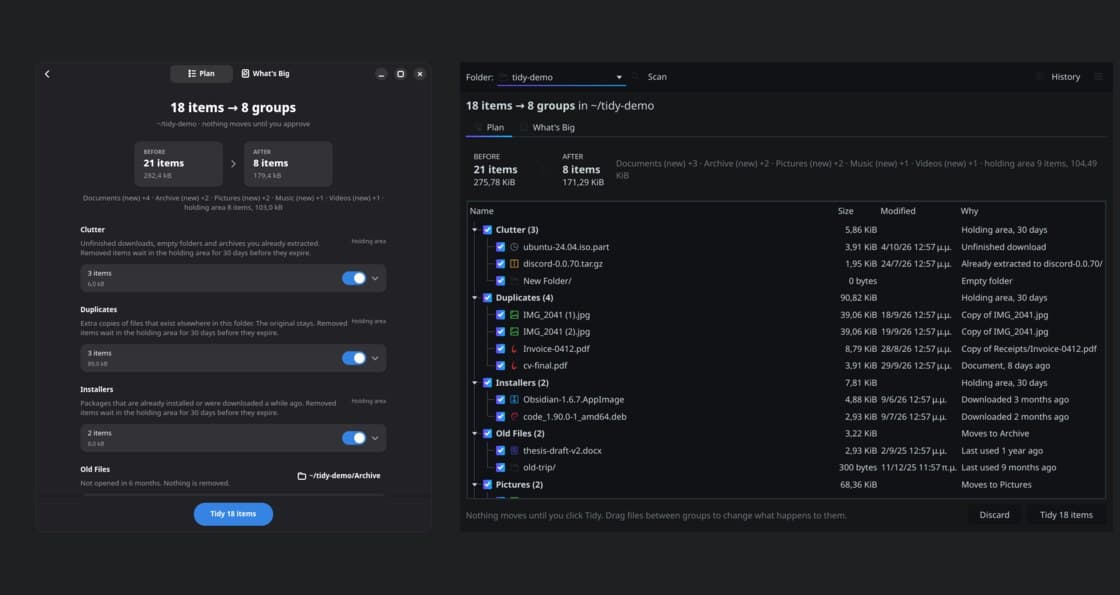
So I built a small app for it. It is called Tidy, and the whole idea fits in one sentence: point it at a messy folder, it shows you a plan to tidy it, you approve the plan, it runs, and you can undo it.
Why not just use a script?
There are already good tools for this on Linux: fdupes for duplicates, organize for rule-based
sorting, and the many Hazel-style clones. The thing they have in common is that they expect you to
write the rules. You need to know what a glob is, which flags to pass and what will happen when you
press enter, which for a cleanup tool is a bit scary.
Tidy works the other way around. It proposes, you approve. You never write a rule, and the first thing you ever see is a preview, not a progress bar.
The flow
- Pick a folder. Downloads, Desktop and Documents are one click away, but any folder works.
- Tidy scans it, looking at every file's type, age, size and name.
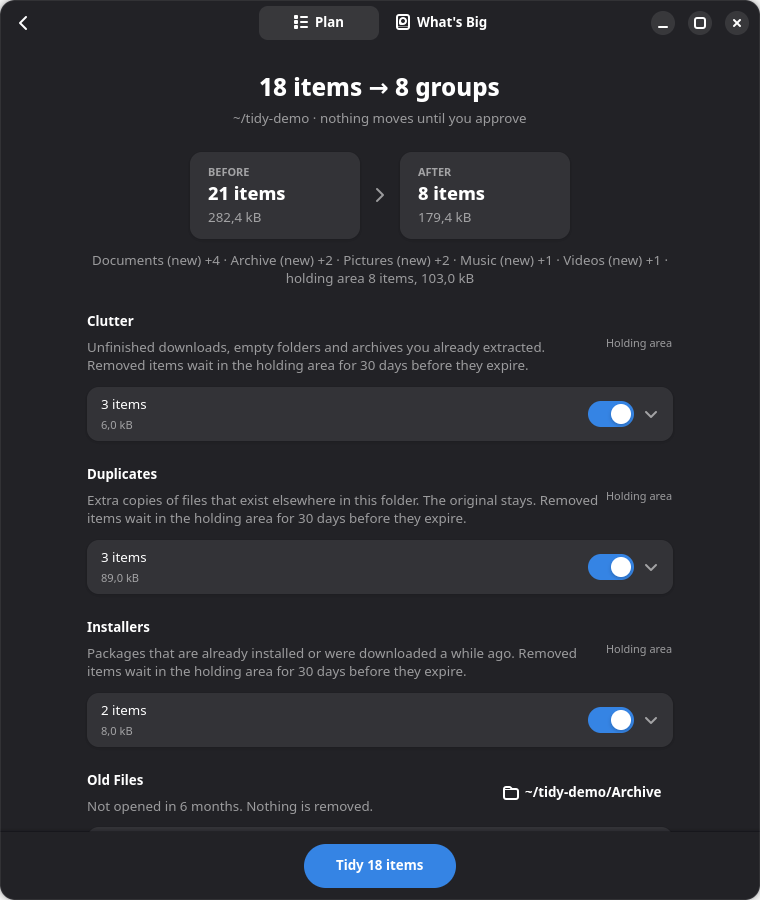
- You get a plan with a before/after summary, something like "21 items → 8 items".
- You can untick whole groups or single files, drag a file into another group, or change where a group goes.
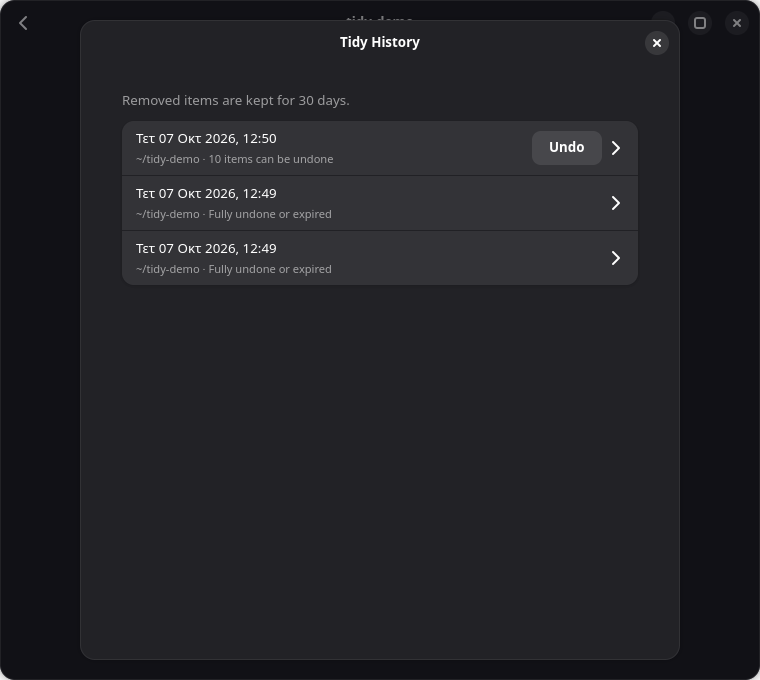
- You press Tidy, and if you change your mind, Tidy History puts everything back.
What it finds
At the moment (version 0.2) Tidy groups things like this:
| Group | What | What happens |
|---|---|---|
| Clutter | unfinished .part/.crdownload downloads, empty folders, archives you already extracted | holding area |
| Duplicates | byte-identical copies, keeping the original | holding area |
| Installers | .deb, .rpm and .pkg.tar.zst files that are already installed, or any installer older than a month | holding area |
| Old Files | things you haven't opened in 6 months | moved to Archive/ |
| Pictures, Documents, Music, Videos, Archives | the rest of the loose files, sorted by type | moved to a folder per type |
The installer check is one of my favourite parts. For .deb, .rpm and Arch packages Tidy reads the
package name from the filename and asks your package manager (pacman -Q, dpkg-query or rpm -q)
whether it is already installed. If it is, there's no reason to keep the 300 MB file around.
For duplicates it first groups files by size, then hashes the first 64 KB, and only hashes the whole file when both of those match. Most files never get fully read, which keeps the scan fast even on a big Downloads folder.
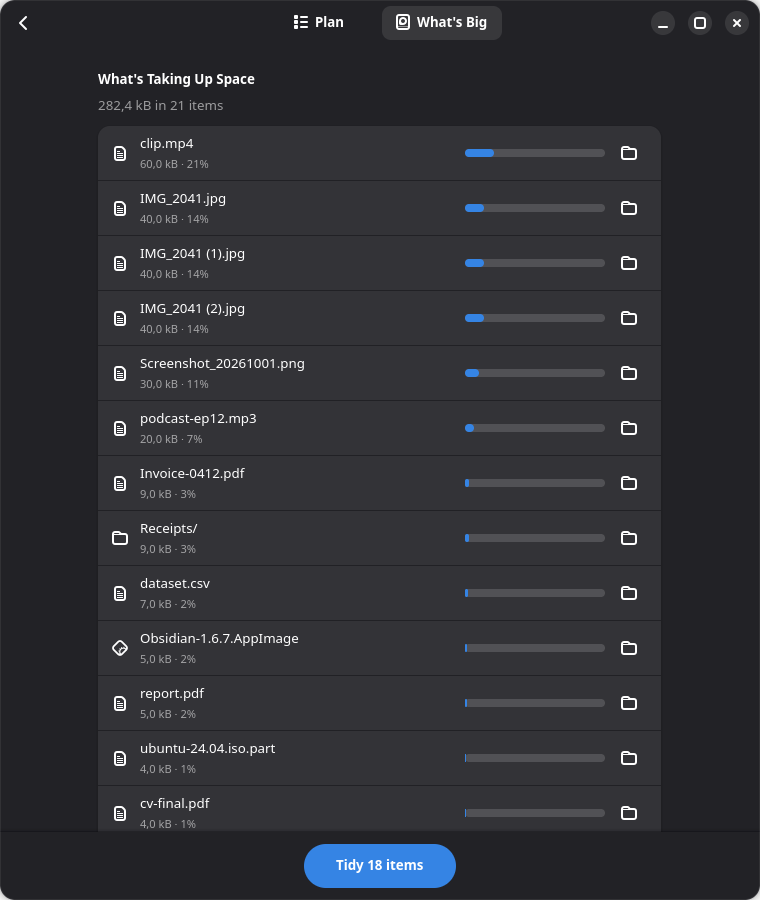
There is also a What's Big tab, because sometimes you don't want to clean, you just want to know where the space went:
Safety is the actual feature
For a tool like this, trust is everything. One wrongly moved file and you would never open the app again, and I wouldn't blame you. So most of the work went into making sure nothing bad can happen:
- Nothing is deleted outright. Removed items go to a holding area for 30 days and only then expire.
- Every move is written to a small SQLite log before it happens. If the app crashes in the middle of a run (or you pull the plug), the next start sees which moves completed and which didn't.
- Undo puts files back exactly where they were. A whole run or a single file. If the original name
has been taken in the meantime, the file comes back as
name (2)instead of overwriting anything. - It never overwrites. Moves use the
renameat2()system call withRENAME_NOREPLACE, so the kernel itself refuses to replace an existing file, even if one appears a millisecond before the move. - Files that changed since the scan are skipped. So is anything modified in the last 10 minutes, because it might still be downloading.
- Protected locations. System folders, hidden files and config, git repositories and project
folders (anything with a
package.json,Cargo.toml,Makefileand so on) are left alone. - Local only. There's no cloud, no account and no telemetry.
There is one small detail I really like. Checking whether a file is "old" uses its last access time,
but reading a file to hash it would update that access time, so every scan would make all your old
files look recently used. Tidy opens files with the O_NOATIME flag, so looking at a file
doesn't count as using it.
Native on GNOME and KDE
This was a hard requirement for me. I use KDE Plasma, but most of the Linux world uses GNOME, and an app that looks foreign on your desktop always feels a little bit wrong.
So Tidy has two frontends sharing one core:
- GTK4 + libadwaita for GNOME, with boxed lists, switches and a pill button, the way GNOME apps look.
- Qt 6 for KDE Plasma, with a tree view, checkboxes, Breeze icons, your file manager's MIME icons and your locale's date and size format.
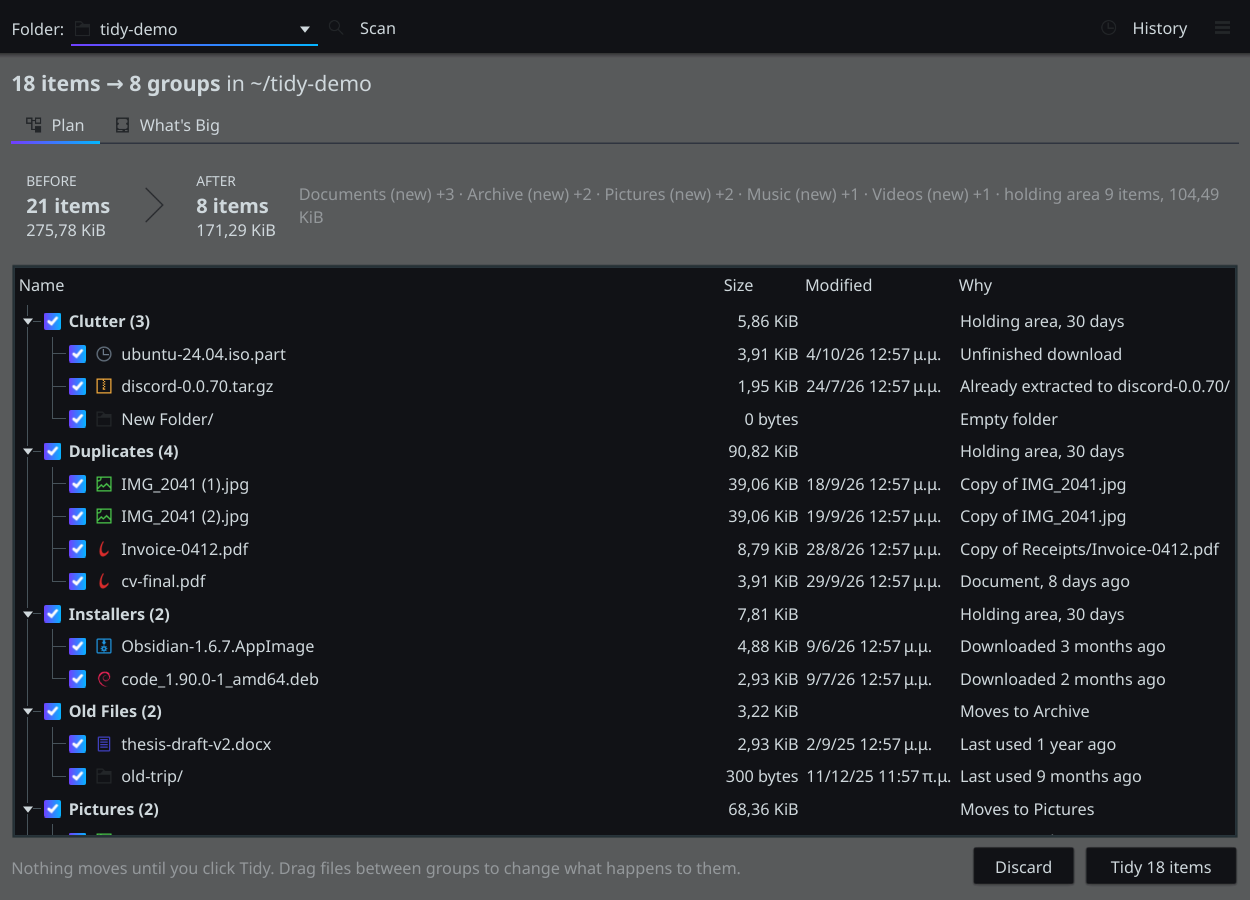
The launcher looks at XDG_CURRENT_DESKTOP and picks the right one on its own. You can also force one:
tidy --qt
TIDY_UI=gtk tidy
The core is plain Python with only the standard library, and both frontends use the GTK and Qt bindings your distribution already ships (PyGObject and PySide6). There's no Electron and no bundled 600 MB runtime.
There's also a CLI
Because sometimes you're already in a terminal:
$ tidy-cli scan ~/Downloads
/home/mustapha/Downloads: 19 files, 282.4 kB
18 items -> 8 groups, 103.0 kB can be freed
before: 21 items, after: 8 items

Duplicates (3 items, 89.0 kB) -> holding area (30 days)
  IMG_2041 (1).jpg  [40.0 kB] Copy of IMG_2041.jpg
  ...
tidy-cli scan is always a dry run. You need --apply to actually move anything, and
tidy-cli undo takes it back.
Does it run on my distro?
Probably! I didn't want "works on my machine" to be the answer, so the project has a test script that spins up clean containers of the big distributions and does the following in each one:
- installs that distro's own GTK, libadwaita and PySide6 packages
- runs the unit tests and drives both GUIs through scan → tidy → undo under a virtual X server
- runs the installer
At the moment it passes on Ubuntu 24.04 and 26.04, Debian 13, Fedora 44, Arch and openSUSE Tumbleweed. The only gap is Ubuntu 24.04, which doesn't package PySide6, so there you get the GTK version everywhere.
What's next
The roadmap from here:
- v0.3: content-aware grouping. A PDF with "Invoice" and a total in it is a receipt, so suggest a
"Receipts 2026" folder. Tidy will also learn your habits: if you always move bank statements to
~/Finance, it offers that next time. - v0.4: an optional watch mode that nudges you once in a while ("47 new files. Tidy up?") and rules you can write as plain sentences, like "Move screenshots older than 30 days to Pictures/Screenshots". Nothing will ever move on its own unless you turn on auto-tidy for that specific rule.
The rule for all of it stays the same: the preview, the undo and the holding area come first, and the smart features only come after them.
Thanks for reading, and may your Downloads folder be forever tidy.